
Running into issues with editing your Amortization Schedules? We’ve been there! We hope this visual walk-through guide can help your business.
In this example, our bill is to start being recognized at the end of August.
The current schedule breaks the recognition down by month which is how in this example we have the schedule template configured. However, this case is unique and only for this entry we need it to be different.
Let’s say we pay a lump sum of $3000.00 to cover August, September, and October. The schedule needs to begin recognizing the expense again in November and December for $1000.00 each. Is this possible?
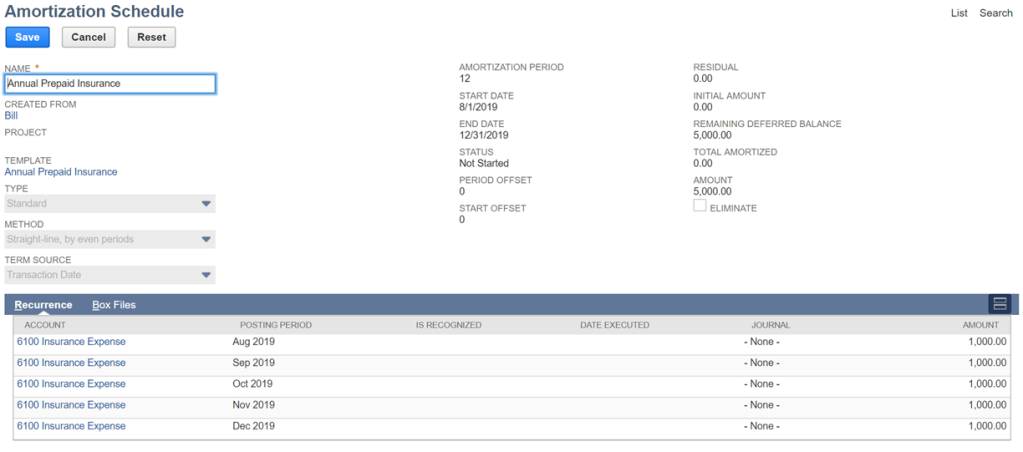
Absolutely! To do this, we just edit the schedule.
Remember: Your company needs to have this option enabled.HOW TO ENABLE AMORTIZATION SCHEDULE EDITING

Simply modify these at their line levels and change the amount to match the lump sum, in this case $3000.00. Then remove the lines for the months that you don’t want the schedule to run on.
Easy right?
Please like this post if it was helpful to you!
Join GDS at SuiteWorld: Discover OnSight and Transform Your Field Service Operations!
We’re thrilled to announce that GDS will be showcasing our...
Read More
Sustainability in Field Service: Strategies for Going Green
For field service professionals, adopting sustainable practices is not just...
Read MoreThe Crucial Role of Real-Time Data in Field Service Operations
Author: GDS In our rapidly evolving landscape, a field service...
Read MoreEmpowering Your Field Technicians with the Right Tools and Training
Author: GDS In today’s fast-paced, technology-driven world, the field service...
Read More